
Role
Lead UX Designer
|
Category
Android 13
|
Approach
Lean UX/Agile
|
Duration
4 months
|
Tools
Figma, Figjam, Photoshop
|
WildlifeGo is a nature exploration and identification app designed for Android systems. For my Interaction Design II class at Kennesaw State University, I led a team of four students to design the prototype for WildlifeGo. We built this prototype by following an adaptation of Gothelf and Seiden's Lean UX framework, which they describe as "using design thinking and Agile development philosophies to bridge the speed of Agile and the need for design in the product-development life cycle." Acting as Scrum Master, I guided my team through Lean UX to develop our proto-personas, establish our desired business/user/customer outcomes, and iterate on our prototype design.
Meet the Team

From left to right: Angela Chude, Zarek Lacsamana, Ayisha Diaby, Sydney Bishop
What is WildlifeGo?
At the beginning of my 2023 Fall semester, everyone in our class pitched an idea for an interface. As an avid pokemon-lover and nature photographer, I pitched an idea that combines my love for collecting little creatures and learning more about my natural environment. My idea is to create a mobile app that encourages users to observe and identify as many species of wildlife as they can in order to earn unique rewards and show off their findings to other users. After all the pitches, the class all voted on whose project we would most want to work on. With several students excited about my project idea, the WildlifeGo app was born.
Adapting Lean UX
Lean UX is a user experience (UX) design framework developed by Jeff Gothelf and Josh Seiden that takes inspiration from the fast-paced and iterative nature of lean and agile development methodologies. It places a strong emphasis on collaboration, quick iterations, and a focus on delivering value to users with minimal waste.
To adapt Lean UX for our classroom setting, we borrowed a few key concepts to structure our design process. We began by following the Lean UX Canvas to declare our assumptions about who would use our product, what problems our product would solve, and what customer, user, and business outcomes we wanted to achieve. The Lean UX Canvas helped us break down these important conversations into small, collaborative exercises among the team. After we declared our assumptions, we worked through two 3-week Sprints to test and validate our assumptions.
To adapt Lean UX for our classroom setting, we borrowed a few key concepts to structure our design process. We began by following the Lean UX Canvas to declare our assumptions about who would use our product, what problems our product would solve, and what customer, user, and business outcomes we wanted to achieve. The Lean UX Canvas helped us break down these important conversations into small, collaborative exercises among the team. After we declared our assumptions, we worked through two 3-week Sprints to test and validate our assumptions.
Lean UX Canvas

The Lean UX Framework
Sprint 1, Week 0: Declaring Assumptions
Using the Lean UX canvas as a guide, my team and I completed a series of collaborative exercises to help us lay out our assumptions about the app we were trying to create. We identified a business problem, discussed who our potential users would be, and hypothesized how we might achieve our desired business and user outcomes. Following the Lean UX canvas helped us get on the same page as a team. We were able to achieve a unified understanding of our product domain and develop a plan for how we were going to design our app.
As team leader, I scheduled each of these exercises as short meetings and led the discussion for each meeting. Since this was a class project, and thus no real business or stakeholders were involved, I asked my team to think about what potential business problems we would theoretically be trying to solve. Next, I asked the team how we might answer those business problems while also meeting the needs of our hypothetical customers. These discussions led us to develop our hypotheses. By asking the team, "What's the most important thing we need to learn first?" and "What's the least amount of work we need to do to learn the next most important thing?", we created a hypothesis table to prioritize our hypotheses and order them by risk. After identifying which hypotheses were the highest risk with the highest potential value, we created our Sprint 1 product backlog in order to test our highest-priority hypotheses.
As team leader, I scheduled each of these exercises as short meetings and led the discussion for each meeting. Since this was a class project, and thus no real business or stakeholders were involved, I asked my team to think about what potential business problems we would theoretically be trying to solve. Next, I asked the team how we might answer those business problems while also meeting the needs of our hypothetical customers. These discussions led us to develop our hypotheses. By asking the team, "What's the most important thing we need to learn first?" and "What's the least amount of work we need to do to learn the next most important thing?", we created a hypothesis table to prioritize our hypotheses and order them by risk. After identifying which hypotheses were the highest risk with the highest potential value, we created our Sprint 1 product backlog in order to test our highest-priority hypotheses.
Problem Statement
We came to the assumption that that the current state of environmental education apps has focused primarily on information accuracy and experienced individuals, while failing to address information design, user engagement, and functionality.
We believed our app would address this gap by encouraging community involvement, incorporating effective learning strategies, and delivering improved information architecture.
We believed our app would address this gap by encouraging community involvement, incorporating effective learning strategies, and delivering improved information architecture.
Proto-Personas
We established that our app would fall into the domain of environmental education, so we assumed that curious-minded individuals would be the most interested in using our app. We hypothesized that although there are various nature identification apps out there, none of them offer a collaborative, competitive environment for users to show off their discoveries and receive genuine appreciation of their discoveries from like-minded individuals. We believed that our users want to feel like they’ve learned something new while also having fun, feeling accomplished and receiving acknowledgement. We aimed to validate these assumptions through testing.
During this Sprint, we created one initial proto-persona— Noelle. Noelle is a young adult who likes taking photos of nature while walking her dog and going on hikes. She has a curious mind and wants to know more about the natural world around her. She also wants to share her discoveries with others who will appreciate what she found.
During this Sprint, we created one initial proto-persona— Noelle. Noelle is a young adult who likes taking photos of nature while walking her dog and going on hikes. She has a curious mind and wants to know more about the natural world around her. She also wants to share her discoveries with others who will appreciate what she found.

Proto-Persona #1, Noelle
Sprint 1 Backlog
After going through all of the exercises in the Lean UX canvas, we discussed what features we wanted to test during this Sprint. We used a hypothesis prioritization canvas to figure out which hypotheses posed the most risk for us to develop but offered the highest potential reward. We decided to prioritize the development of the observation log, which would catalog the user's discoveries and educate them on the species they found. We also thought it was necessary to test the social aspect of the app, which included features such as the community observation map and community projects/events.

Sprint #1 Backlog
Sprint 1, Weeks 1 & 2: Testing the Wireframes
We interviewed three participants each week, for a total of six interviews throughout the sprint. Our goal was to interview individuals who we thought would identify with our proto-persona. To find potential interview candidates, we developed a screening survey which we sent out to multiple nature-focused clubs at Kennesaw State University, as well as nature-focused Reddit threads and Facebook groups. We prioritized the candidates who already had an interest in nature, with a particular focus on those who are still learning, rather than subject matter experts. Throughout the two-week Sprint, we held 2-day standup meetings where I delegated tasks to the team, discussed our progress with the project, and decided what needed to be done before our next meeting or interview.

Screening Survey
What We Tested
We began our first week of testing by developing a standard script to follow for our interviews. This script included some general questions about a participant's feelings, behaviors, and attitudes surrounding nature and nature identification apps. We also created low-fidelity wireframes of the features in our Sprint backlog to show during our first interview. Each member of the team took turns moderating the interviews, which were typically held by video-conference call on Microsoft Teams. After each interview, we took note of the patterns we noticed and feedback we received to iterate on our wireframes. We focused on testing features from our Sprint 1 backlog including the observation log, community map and community projects/events. We also decided to begin testing the incentives and rewards, such as badges, titles, and a leaderboard. This decision was made because we noticed that these features were critical to the social aspect of the app.

Sprint #1: User Research Interview
|

Sprint #1: Usability Testing
|
Affinity Mapping
We completed affinity maps as a team after finishing each interview using the online whiteboarding tool FigJam. Affinity mapping is a timed, collaborative exercise which helps synthesize research findings. Before we began, I asked the team to think about what were the most important takeaways from the interview and what information stood out to them the most. Next, we spent ten minutes listing our findings from the interview in the form of quick, short sticky-notes. These findings included behavioral patterns we may have noticed or any feedback we received on the wireframes. After the first ten minutes were up, we spent the next 20-30 minutes organizing our findings into groups based on observable patterns. These affinity mapping exercises helped the team reach an understanding on the most important takeaways from each interview.

Sprint #1: Affinity Mapping
Main Takeaways
- Most participants desired to learn "fun facts" when they identify an unknown species of wildlife. While many identification apps offer basic information about a species, many participants wished that these apps would present more unusual, lesser-known, and/or exciting facts in addition to the basic information.
- Many participants expressed frustration with getting an accurate identification of a species. Camera quality and confidence level in AI recognition software were some of the pain points users experienced when using other nature ID apps.
- Some participants desired a way to organize and navigate through their observations as well as the observations of other users.
- Though all participants feel that having the ability to share discoveries and accomplishments with others is important, some participants were less socially-motivated than others.
Retrospective
At the end of our first Sprint, I invited the team to participate in a retrospective meeting to reflect on what went well, what could've gone better, and what we will try next during our second Sprint. Our screening survey was a big success, so we had no issue finding potential interview candidates. I delegated the task of reaching out to our survey participants for scheduling to Angela and Ayisha, who were a big help with scheduling interviews in a timely manner. Each team member moderated two of the six interviews, which ranged from 45 minutes to an hour long. We were all able to practice interviewing the candidates, so over time we asked better questions and had deeper discussions about our findings. However, we soon felt that we needed to revisit our Lean UX canvas altogether because we had a hard time maintaining focus on the hypotheses we decided to test in this Sprint. The results of our affinity maps were leading us further away from our initial assumptions.

Sprint #1: Retrospective
Sprint 2, Week 0: Revalidating Assumptions
We started off our second Sprint by revisiting our Lean UX canvas. Following our discussion from the Sprint 1 retrospective, I asked my team to think about what we learned, what has changed, and what we should revisit. We agreed that we needed to revalidate our problem statement, proto-personas, and hypotheses.
New Problem Statement
Based on our findings from Sprint 1 testing, we came to the assumption that the current state of nature identification apps has focused primarily on AI recognition and documentation of species. What existing apps fail to address is identification accuracy, engaging users with incentives and community, and detailed search functionality for range maps.
Our app will address this gap by incorporating manual validation with AI recognition, encouraging progression and collaboration with displays of achievements, and expanding the filtering options for the range map.
Our app will address this gap by incorporating manual validation with AI recognition, encouraging progression and collaboration with displays of achievements, and expanding the filtering options for the range map.
Proto-Persona Iteration
One of our main takeaways from our first sprint was that some users are more socially driven than others. While some of our interview participants felt encouraged by sharing with and showing off to other users like our initial proto-persona Noelle, the other participants were less socially-driven. These participants were more concerned with the accuracy and organization of information concerning species identification. However, they still liked having the option to use the social features in the app if they wanted to. We decided to create a second proto-persona in addition to Noelle in order to represent this behavioral pattern we observed. Thus, the new proto-persona Craig was born.

Proto-Persona #1, Noelle
|

Proto-Persona #2, Craig
|
Focusing on MVPs
We revisited our hypothesis statements to incorporate new features we wanted to test based on the feedback we received from Sprint 1 interviews. Recognizing the importance of making the species identification process reliably accurate and easy to do, we decided to incorporate a questionnaire feature inspired by the dichotomous key. A dichotomous key is a binary tool for identifying of plants and animals. It is written as a sequence of paired questions, the choice of which determines the next pair of questions until a name or identification is reached.
We also decided to incorporate detailed search and filter functionality for the community map and the user profile. The community map shows observations made by all users, whereas the profile houses the user's personal collection of observations. We wanted to concentrate on allowing our users to navigate quickly and easily between observations recorded across all sections of the app.
With the addition of the questionnaire and expanded filtering capabilities, we still wanted to continue testing our social features such as the badge rewards, community projects, and leaderboard that we experimented with in Sprint 1. The team agreed that we needed more time to flesh out and thoroughly test these features before incorporating them into our final product.
Following the changes made to our hypotheses, we needed to update our hypothesis prioritization canvas. We realized our identification questionnaire had a high perceived value but posed a high risk if not executed properly.
We also decided to incorporate detailed search and filter functionality for the community map and the user profile. The community map shows observations made by all users, whereas the profile houses the user's personal collection of observations. We wanted to concentrate on allowing our users to navigate quickly and easily between observations recorded across all sections of the app.
With the addition of the questionnaire and expanded filtering capabilities, we still wanted to continue testing our social features such as the badge rewards, community projects, and leaderboard that we experimented with in Sprint 1. The team agreed that we needed more time to flesh out and thoroughly test these features before incorporating them into our final product.
Following the changes made to our hypotheses, we needed to update our hypothesis prioritization canvas. We realized our identification questionnaire had a high perceived value but posed a high risk if not executed properly.

Hypothesis Prioritization Canvas
Sprint 2, Weeks 1 & 2: Testing the Prototype
These weeks worked similarly to how they did in Sprint 1. We interviewed three participants each week for a total of six interviews. Our screening survey was losing traction, so weren't able to rely on it as much for scheduling. However, we still did our best to reach out to those who had an interest in nature, nature identification apps, and/or mobile gaming. Additionally during this sprint, we transitioned our wireframes to higher-fidelity prototypes to give our participants a more realistic experience of using the app.
How We Tested
We maintained our system from Sprint 1 and took turns moderating each interview. We spent the first half of an interview asking general questions like we did in Sprint 1 and spent the second half focusing on testing the prototype. If the interviewee was a returning participant, we spent less time on general questions and more time on the prototype. During the testing phase of an interview, we would share the Figma prototype links with our participants and ask them to complete various tasks in the prototype or offer feedback on certain aspects of the prototype.

Sprint #2: User Research Interview
|

Sprint #2: Usability Testing
|
What We Tested
We established a style guide and design system for the app before transitioning our wireframes into higher-fidelity prototypes. We created brand colors, typography and iconography to be used consistently throughout the prototype. We also created complex components to serve as flexible building blocks for the core features of our app. Using the design environment we established, we developed the high-fidelity prototype of the features we wanted to test for this Sprint backlog. We established a user flow to guide our interview participants through various tasks such as confirming an observation, exploring the community map, viewing the options in their profile, and navigating to community projects.

Color Palettes
|

Typography
|
Refinement
Once Sprint 2 had ended, it was time for the team to discuss how we would move forward with our final changes. We took this time to polish our core functionalities. The questionnaire for species identification was changed to a multiple-choice style with detailed descriptions and reference images for each question. We added more complexity to the search and filter functionalities for the community map and profile. We refined the styling and presentation of the badge awards and allowed the user to equip their favorite badge as their title, which would be viewable by other users. Finally, an onboarding section was added to enhance the user's immediate understanding of the app.
Final Prototype
Explore
Explore the community map to view nearby discoveries made by yourself and other users. Aim to find the most species in your area to earn the top spot on the local leaderboard!

Species Range Map
|

Leaderboard
|
Species ID
|
Profile
On your profile, you can sort through your collection of observations. You can also view challenges and milestones which will reward you with unique, equippable badges to show off to other users.

Profile - Observations
|

Profile - Challenges
|

Challenge Details
|
Projects
With Projects, users can collaborate with other users towards a common goal. Contribute to initiative started by one of our partner organizations, all of which are dedicated to environmental education and conservation.

Community Projects
|

Project Contributions
|

Project Contributors
|
Identification
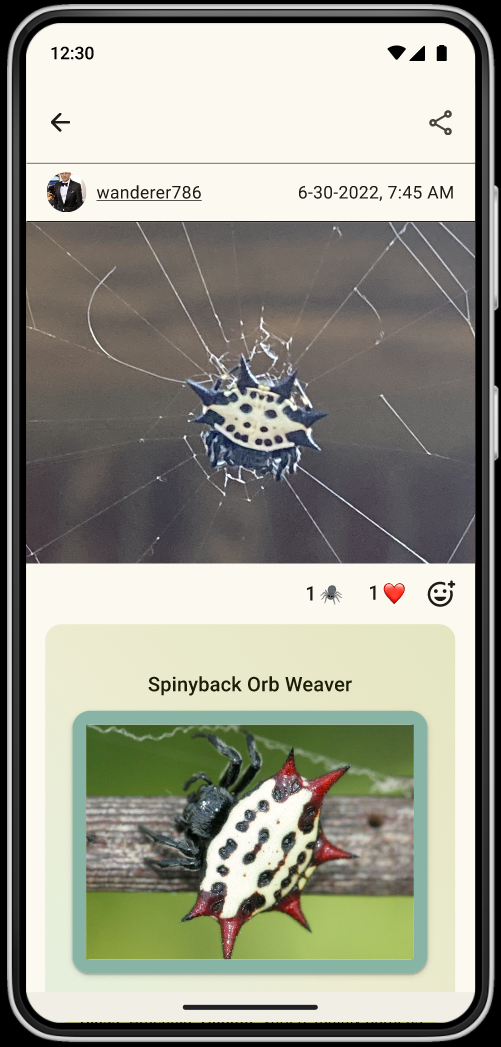
When you make an observation, the app will identify the species shown in your photo. You can choose an AI suggested identification, or refine the AI's suggestion by completing a quick questionnaire. Once you identify something, you can learn some fun facts about it, contribute the observation to a project, and potentially complete a challenge and/or milestone!

Identifying a Species
|

Manual Validation of Species ID
|

Questionnaire for Manual ID
|
Reflection
I really enjoyed collaborating with my team and getting to know them this semester. Lean UX was daunting at first, but my team was eager to participate and made my job of planning the work that much easier. Despite a few bumps along the way, I'm proud of what we were able to accomplish given the time constraints of a lean design environment. These are my main takeaways from this experience:
- Not every designer has the same level of experience with a design tool. For our project, we worked mainly in Figma. One of my team members was a cut above the rest in terms of Figma skills, whereas the other two had barely any experience with auto-layout. Understanding how to equitably distribute work amongst a team is an important skill to have when leading a project.
- Having a subject matter expert (SME) on a design team offers a distinct advantage over a team without one. I proposed this idea for nature identification, but I myself do not have much experience in biology or identifying wildlife. If I had been more knowledgeable, or proposed an idea about something I am more knowledgeable about, I would have been able to guide the team more quickly and effectively through the design process.
- If you can't be a SME, making time for research makes a huge difference. Though we dealt with the time constraints of Lean UX, we did as much research as we reasonably could to improve our design. I wish we had more time to research the dichotomous key/questionnaire, as that feature was the most difficult one for me to wrap my head around.
- Managing a large design file shared between multiple people requires consistent organization. Everyone must be on the same page for how to use a design system. They must know how to name their layers, how to use components, and how to follow the style guide.
- Iteration is a part of the process, so it's important not to get worked up about constant changes and reworks of things you work hard on. Incorporating feedback from testing or from your teammates helps you create something better than you would have without it.